EFFECTS
GFe – Lexicon Reverb
GFE – Lexicon Reverb is inspired by the algorithms developed by David Griesinger for Lexicon processors and described by Jon Dattorro in his landmark 1997 AES paper. The algorithm employs a network of delay lines, all-pass filters, and feedback paths to produce a dense, natural, and spacious reverberation tail, making it one of the reference architectures for modern algorithmic reverb design.
The entire project was developed for educational and research purposes, demonstrating how a fully customizable Reverb can be created through visual programming in Max for Live while exploring the fundamental principles of digital audio processing.
For to use this plug in you must install LowkeyNW library on Max.

Open source for: Max for Live
Developed by: Gigi Ferruccio
Required: Ableton 11 with MAX 8 or later.
GFe – Delay
GFE – Delay is developed entirely in Max for Live, uses the tapin~ and tapout~ objects to implement a digital delay line based on an audio buffer. Their operation is inspired by the principle of analog tape delays, where the signal is recorded by a record head and played back by one or more playback heads positioned at different distances. The device was designed as a flexible effects processor for sound design and stereo spatialization.
The device provides independent delay time control for the left and right channels, allowing the creation of stereo echoes, offset rhythms, and complex delay patterns. Each channel can also be synchronized independently to the Ableton Live transport or operated with free delay times, offering a wide range of creative possibilities.
The entire project was developed for educational and research purposes, demonstrating how a fully customizable Delay can be created through visual programming in Max for Live while exploring the fundamental principles of digital audio processing.

Open source for: Max for Live
Developed by: Gigi Ferruccio
Required: Ableton 11 with MAX 8 or later.
GFE – Delay II
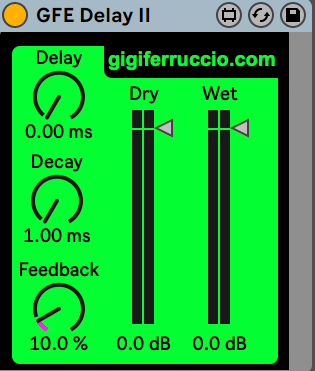
GFE – Delay II is developed in Max for Live and uses a network of all-pass delay stages to create rich echoes and spacious ambience while preserving the character of the original signal.
Unlike a conventional digital delay, GFE – Delay II focuses on the diffusion and movement of the repeats, generating a wider and more organic stereo image. The combination of delay lines and all-pass filters produces reflections that range from subtle room-like ambience to dense, evolving echoes, making it suitable for both rhythmic processing and atmospheric sound design.
The entire project was developed for educational and research purposes, demonstrating how a fully customizable Delay can be created through visual programming in Max for Live while exploring the fundamental principles of digital audio processing.
For to use this plug in you must install Virtual Sound library on Max.
Open source for: Max for Live
Developed by: Gigi Ferruccio
Required: Ableton 11 with MAX 8 or later.
GFe – Ping Pong Delay
GFE Ping Pong Delay is developed entirely in Max for Live, uses the tapin~ and tapout~ objects to implement a digital delay line based on an audio buffer. Their operation is inspired by the principle of analog tape delays, where the signal is recorded by a record head and played back by one or more playback heads positioned at different distances.
A Ping Pong Delay is a specific type of stereo delay in which the repeated signal alternates between the left and right channels, creating a continuous movement across the stereo field. This behavior produces a greater sense of width and depth than a conventional stereo delay, making it particularly suitable for enhancing the spatialization of instruments, vocals, and sound textures.
The device uses a single delay time shared between both channels, which can be synchronized to the Ableton Live transport or set freely in milliseconds, allowing both tightly synchronized rhythmic effects and more open, spacious delay textures.
The entire project was developed for educational and research purposes, demonstrating how a fully customizable Ping Pong Delay can be created through visual programming in Max for Live while exploring the fundamental principles of digital audio processing.

Open source for: Max for Live
Developed by: Gigi Ferruccio
Required: Ableton 11 with MAX 8 or later.
GFe – Bit Cruscher
GFE Bit Crusher is developed entirely in Max for Live, uses the degrade~ object to reduce the bit depth and sample rate of the incoming audio signal, recreating the distinctive lo-fi sound characteristic of early digital technologies and classic video game consoles.
The device allows precise control over the amount of signal reduction by adjusting both the sample rate and bit depth, introducing digital artifacts and timbres typical of low-resolution digital synthesis. In addition to standard stereo processing, the patch can also operate in mono mode by processing a single channel and routing the resulting signal to the stereo output.
The entire project was developed for educational and research purposes, demonstrating how an audio bit reduction processor can be created through visual programming in Max for Live while exploring the fundamental principles of digital quantization and downsampling.

Open source for: Max for Live
Developed by: Gigi Ferruccio
Required: Ableton 11 with MAX 8 or later.
GFe – Flanger
GFE – Flanger is developed in Max for Live, uses the tapin~ and tapout~ objects to create a variable delay line controlled by a low-frequency oscillator, recreating the characteristic phase modulation effect of flanging.
The device allows control of the delay modulation through an LFO with a sinusoidal or triangular waveform. The triangular waveform can be transformed into a sawtooth-like shape through the PW (Pulse Width) control, offering a wider range of modulation behaviors. The device also provides control over feedback, pitch, and modulation speed (Rate).
The For Exp Rate function extends the range of the Rate parameter, allowing extremely high modulation frequencies beyond the traditional behavior of a flanger. This mode enables the creation of new timbral transformations, generating metallic effects, harmonic variations, and experimental sound textures.
The entire project was developed for educational and research purposes, exploring the creation of an audio modulation processor through visual programming in Max for Live and investigating the principles of variable delay, cyclic modulation, and feedback.

Open source for: Max for Live
Developed by: Gigi Ferruccio
Required: Ableton 11 with MAX 8 or later.
GFe – Chorus
GFE – Chorus is developed in Max for Live, uses the tapin~ and tapout~ objects to create four independent delay lines, modulating the delay time through low-frequency oscillators. The combination of different delay times generates the characteristic doubling and widening effect typical of chorus processing.
The device allows control of the modulation of the four voices through dedicated parameters, adjusting the effect depth, modulation speed, and delay time. The presence of multiple delay lines creates a richer and more complex stereo movement, simulating the temporal and timbral variations of multiple overlapping sound sources.
The entire project was developed for educational and research purposes, exploring the creation of a delay-based modulation effect through visual programming in Max for Live and investigating the acoustic principles behind the perception of width, movement, and timbral variation in audio signals.
For to use this plug in you must install Virtual Sound library on Max.

Open source for: Max for Live
Developed by: Gigi Ferruccio
Required: Ableton 11 with MAX 8 or later.
GFE – Phaser
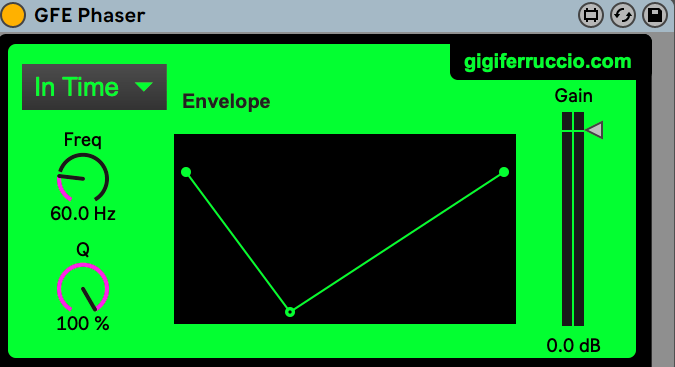
GFE – Phaser is developed in Max for Live and recreates the characteristic phasing effect through a network of all-pass filters, generating moving frequency cancellations (notches) across the spectrum. The device allows control of the center frequency and includes an Envelope Follower that analyzes the input signal to dynamically modulate the phase response according to its amplitude.
A dedicated Side Chain function enables the envelope follower to be driven by an external audio source, making the processor particularly effective for creating spectral space between elements such as kick drum and bass without relying on traditional side-chain compression.
The entire project was developed for educational and research purposes, exploring the creation of a phaser modulation effect through visual programming in Max for Live and investigating the acoustic principles behind the perception of width, movement, and timbral variation in audio signals.
For to use this plug in you must install Virtual Sound library on Max.
Open source for: Max for Live
Developed by: Gigi Ferruccio
Required: Ableton 11 with MAX 8 or later.
INstruments
GFi – Chip Tune
GFI – Chip Tune is developed entirely in Max for Live, is inspired by the Game Boy audio chip and was created as a research and experimentation project focused on low-resolution digital synthesis.
The device features four oscillators: two Pulse generators with variable duty cycle, one Wavetable oscillator, and one Noise generator for creating percussion sounds and sound effects. It also includes a Frequency Sweep system inspired by the behavior of the original chip’s Pulse 1 channel, allowing dynamic pitch modulation effects.
The entire project was developed for educational and research purposes, demonstrating how the operation of a classic audio chip can be reinterpreted through visual programming in Max for Live and the fundamental principles of digital sound synthesis.

Open source for: Max for Live
Developed by: Gigi Ferruccio
Required: Ableton 11 with MAX 8 or later.
GFi – Impact II Gen
GFE – Impact Generator II developed in Max for Live, is a sound generator designed for the creation of impacts, transients, and sub sounds without the use of pre-recorded audio samples.
The device allows the selection of the initial waveform, used as the sound source, and processes the signal through a chain of effects consisting of ADSR, granular processing, filter, and LFO. This system allows dynamic shaping of the sound evolution over time, controlling its attack, duration, harmonic content, and timbral variations.
The sound generation is based on the synthesis of a sub component and the transformation of the initial waveform through the integrated effects, providing an alternative approach to traditional sample-based techniques. The generator’s pitch can be controlled through the initial MIDI note, allowing the creation of harmonically coherent impacts that can be easily integrated into a musical composition.
The entire project was developed for educational and research purposes, exploring the possibilities of sound synthesis for the design of percussive effects and transients through visual programming in Max for Live, with a focus on the relationship between sound generation, modulation, and digital signal processing.
For to use this plug in you must install PeR Colate library on Max.

Open source for: Max for Live
Developed by: Gigi Ferruccio
Required: Ableton 11 with MAX 8 or later.
GFi – Noise Gen
GFI – Noise Generator is developed in Max for Live, is a sound generator designed for the creation of sound effects (SFX) without the use of pre-recorded audio samples from external libraries.
The device uses noise as its initial sound source, processing it through a chain of effects consisting of ADSR, filter, granular processing, and Bit Crusher. This structure allows the shaping of the sound’s temporal evolution, control of its spectral content, and the introduction of complex timbral transformations, recreating characteristic effects such as sweeps, textures, transitions, and electronic sound design elements.
The goal of the generator is to provide an alternative approach to traditional sample library-based techniques, allowing the creation of original effects through synthesis and digital signal processing. The combination of modulation, filtering, granular synthesis, and bit reduction enables a wide range of sounds suitable for music production, sound installations, and audiovisual applications.
The entire project was developed for educational and research purposes, exploring the possibilities of noise synthesis and digital signal transformation through visual programming in Max for Live, while investigating the principles behind sound effect design and the creation of complex timbral textures.
For to use this plug in you must install PeR Colate library on Max.

Open source for: Max for Live
Developed by: Gigi Ferruccio
Required: Ableton 11 with MAX 8 or later.
GFi – Pad GEn
GFI – Pad Gen is developed in Max for Live, is a synthesizer designed for the creation of pad sounds through the layering of seven sawtooth waveform oscillators.
The combination of multiple sawtooth waves creates a harmonically rich sound source characterized by a dense and complex timbral structure. The signal is then processed through a chain of effects consisting of ADSR, filter, chorus, granular processing, and reverb, allowing the shaping of the sound’s dynamic evolution, control of its spectral content, and enhancement of its spatial depth.
The structure of the device allows a simple synthesized waveform to be transformed into a complex and continuously evolving sound texture, suitable for creating atmospheres, sonic environments, and harmonic elements within a musical composition.
The entire project was developed for educational and research purposes, exploring the possibilities of subtractive synthesis and digital signal processing through visual programming in Max for Live, with a focus on the relationship between harmonic generation, modulation, and spatial processing of the audio signal.
For to use this plug in you must install LowkeyNW and PeR Colate library on Max.

Open source for: Max for Live
Developed by: Gigi Ferruccio
Required: Ableton 11 with MAX 8 or later.

